Social Home
Pricing
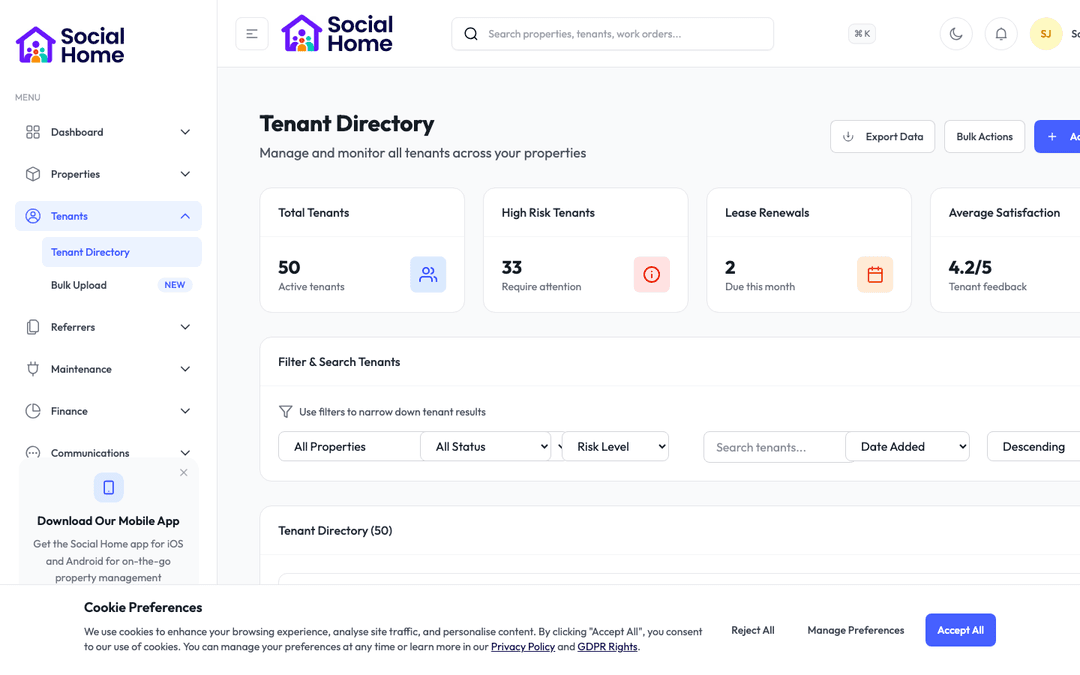
Onboarding dashboard with portfolio setup progress

Implementation managers

Guided onboarding for providers, tenants, and teams

Launch new organisations, invite staff, and bring tenants online with clear steps, fewer delays, and safer permissions.

A messy onboarding process creates confusion before your team has even started using the platform. Social Home turns setup into a guided journey, with checklists for organisations, staff, tenants, and service partners. Everyone sees what they need to complete, reminders keep the process moving, and managers can track progress without chasing through email threads. From first invite to first live workflow, onboarding feels organised, reassuring, and controlled, helping your team reach value faster while keeping identity details, documents, and access permissions consistent from day one.

See this feature in actionCompare alternatives
Go live faster

Why teams invest

  • • Faster go-live
  • • Consistent verification
  • • Tighter permissions

Available on all devices

Access from your computer: full

Use on your mobile device: partial

Your team can work seamlessly whether they're in the office or out in the field. Everything stays in sync automatically, so you always have the latest information at your fingertips.

Pain point

Every new launch starts differently

When onboarding relies on spreadsheets and one-off checklists, each launch depends on whoever happens to run it. Steps get missed, teams ask the same questions repeatedly, and go-live dates drift because there is no single view of progress.

  • • Use guided checklists for company, team, tenant, and provider setup
  • • See exactly what is complete, overdue, or waiting for someone else
  • • Reduce back-and-forth with clear requests and automatic reminders
  • • Give every new customer the same confident first experience
Pain point

Verification information ends up everywhere

Names, documents, emergency contacts, and identity details are often collected in separate files or emails. That makes it hard to know what is current, what is missing, and whether the right evidence is attached to the right person.

  • • Collect identity details, documents, and contact information in one flow
  • • Keep evidence attached to the right tenant, staff member, or provider
  • • Spot missing information before it blocks a tenancy or account launch
  • • Give your team a cleaner record for future checks and audits

Pain point

Access grows messy as teams expand

New staff need access quickly, but giving too much access creates risk. As people change roles or leave, old permissions can stay in place simply because nobody has a clean way to review them.

  • • Start staff with role templates that match their responsibilities
  • • Review who can access sensitive areas before go-live
  • • Keep a clear record of access changes over time
  • • Protect tenant data while still helping teams move quickly

Key capabilities

What you'll love about this feature

Company setup that keeps momentum

Bring a new housing provider or branch online with a clear, resumable setup journey. Capture organisation details, invite key people, review access and select a paid plan with a 30-day trial without relying on scattered notes.

  • • Step-by-step setup for company profile and operating details
  • • Invite staff with clear roles from the beginning
  • • Safe retries preserve the linked company and completed progress
  • • Choose Starter, Growth or Portfolio with a 30-day trial

Tenant onboarding with fewer gaps

Collect the information your team needs before move-in or support begins, from contact details and documents to emergency contacts and support networks. Tenants know what to provide, and staff know what has been received.

  • • Gather documents and personal details through a guided flow
  • • Capture emergency contacts and support networks consistently
  • • Reduce missing paperwork before move-in day
  • • Keep approved tenant information ready for housing officers

Safer access from day one

Give staff and partners the access they need without opening the whole system. Role templates, permission reviews, and change history make access easier to manage as teams grow.

  • • Use role templates for common housing, finance, and support roles
  • • Adjust access for sensitive workflows such as safeguarding or arrears
  • • Review permission changes when staff move roles
  • • Give managers confidence that data access is controlled

Time-saving benefits

Save days of chasing during every launch

Social Home keeps onboarding moving by prompting the right person at the right time. Invites, reminders, missing-document nudges, and setup tasks all stay visible, so implementation managers spend less time chasing and more time helping teams succeed.

  • • Automatic reminders reduce manual chasing for missing steps
  • • Invite links take people straight to the right setup task
  • • Managers see progress across every onboarding journey
  • • New users reach their first useful workflow faster

Real-world scenarios

See how this works in practice

Scenario: A new branch joins the platform

Instead of sending a long email with attachments, you invite the branch into a guided setup. Their manager adds core details, uploads key documents, invites staff, and confirms who should access finance, maintenance, and tenant records. You can see progress live and step in only where help is needed.

  • • Launch with fewer missed steps
  • • Reduce repeated setup questions
  • • Give new teams confidence from day one

Scenario: A tenant needs to move in quickly

A tenant is ready for a room, but the paperwork needs to be complete first. Social Home shows exactly which details, documents, and contacts are missing. The tenant receives a clear request, uploads what is needed, and the housing officer sees the record update immediately.

  • • Avoid move-in delays caused by missing information
  • • Keep documents attached to the right tenant
  • • Give officers a complete view before the tenancy starts

See it in action

Real screenshots from Social Home

These screenshots show exactly what you'll see when you use this feature. Every detail is designed to make your work easier and more efficient.

Onboarding dashboard with portfolio setup progress
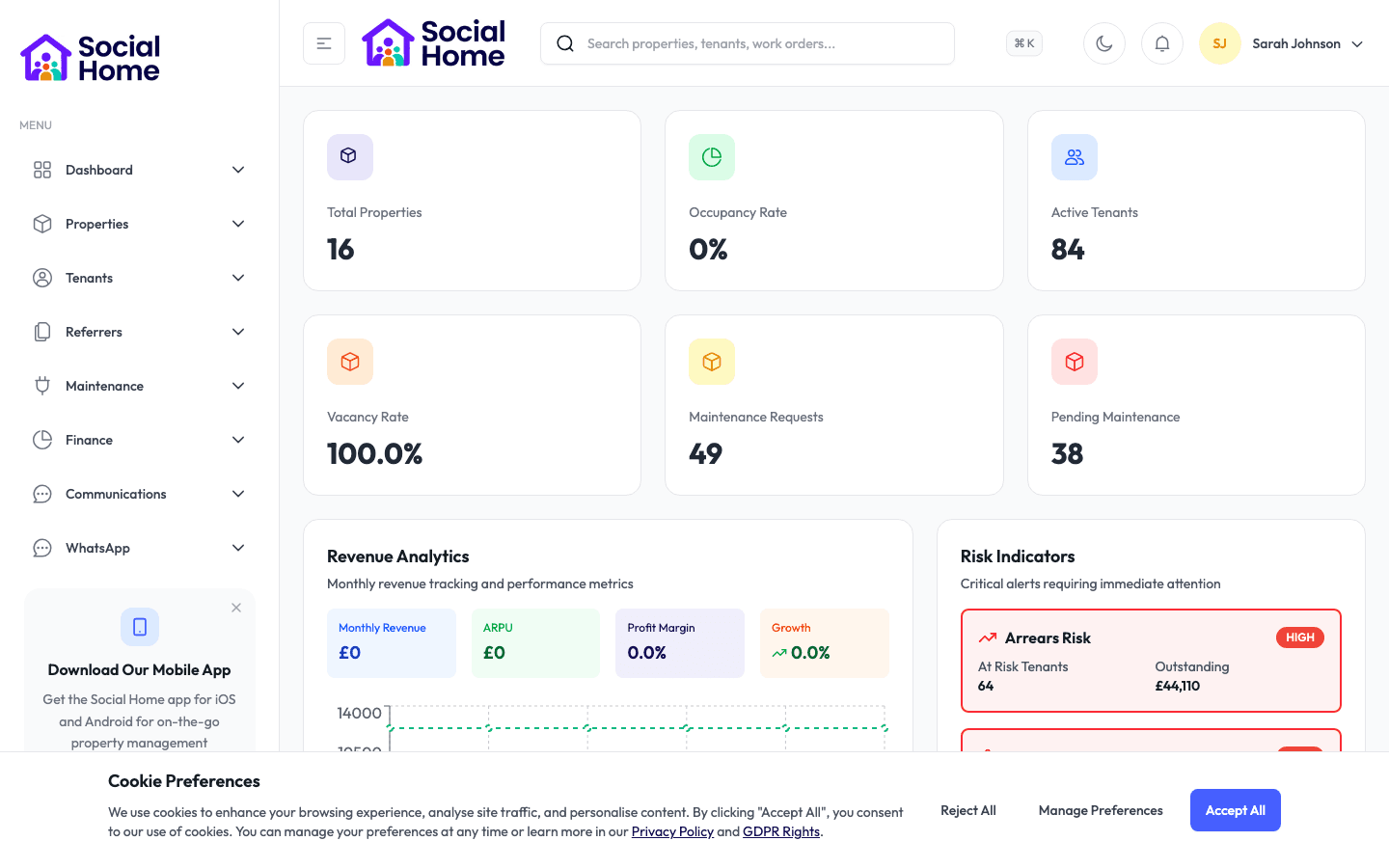
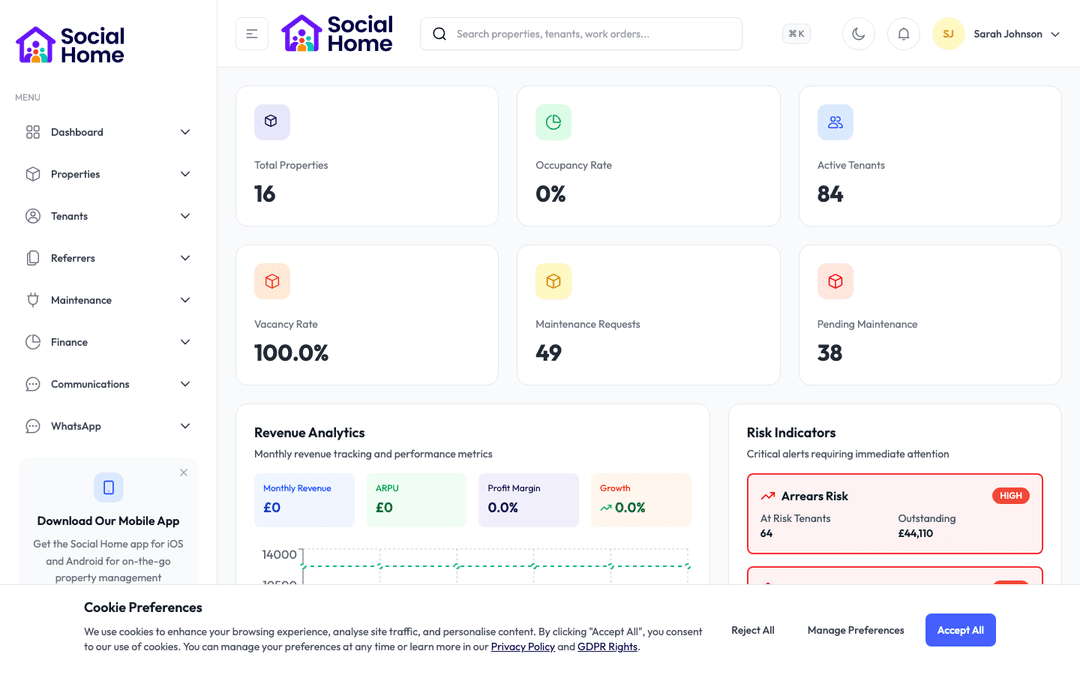
Admin dashboard overview with KPIs and alerts
Tenant 360 with risk and arrears context

Customer perspective

“Implementation used to take weeks of back-and-forth. Now every onboarding task is scripted and trackable with automatic nudges.”

Isabel Green — Implementation Lead, Beacon Housing

FAQs

Everything teams ask before they sign

How quickly can a new team get started?

Most teams can begin using core workflows within days because setup is broken into clear, guided steps. We help you decide which workflows should go live first, then expand once your staff are comfortable. That gives you early value without forcing every department to change at once.

Can onboarding be different for staff, tenants, and providers?

Yes. Each audience can have a different journey, with the right questions, documents, and reminders for their role. A tenant should not see the same setup as a contractor or finance user, and Social Home keeps those journeys separate and easier to manage.

How do we avoid giving new users too much access?

You can start from role templates, then adjust permissions where needed. Managers can review access before launch and revisit it later as people change roles. This keeps onboarding quick without treating sensitive tenant, finance, or safeguarding information casually.

Does housing-provider onboarding include a free plan?

No. Pricing V3 has paid plans only. Eligible new housing providers choose Starter, Growth or Portfolio during onboarding and receive a 30-day trial with no card required at that stage.

How quickly can we get started?

Most teams are up and running within a week. We provide comprehensive onboarding support, including training sessions for your team, data migration assistance, and dedicated support to ensure a smooth transition. You can start using the platform immediately while we help you import your existing data.

What training and support do you provide?

We offer comprehensive training for all team members, including live training sessions, video tutorials, and detailed documentation. Our support team is available via email, phone, and in-app chat. Plus, you'll have access to our knowledge base with step-by-step guides for every feature.

Back to all features →Communications HubTenant ManagementProperty Management

Ready to Transform Your Onboarding & Access?

See how onboarding & access can transform your operations and help you serve your tenants better. Get started with the Social Home platform today.

Book a Free DemoTalk to SalesSee Pricing

See the workflow, discuss your setup, and choose the right plan for your team

Social HomeSocial Home

Making property management simple and accessible for everyone. Find your perfect home or manage your properties with ease.

Stay Updated

Prefer to explore on your own? Browse the platform features →

Rental Services

  • Find rentals
  • Pricing
  • Jobs
  • Contact

Resources & Guides

  • Blog
  • Resources
  • Social Housing Software
  • HMO Compliance Software
  • Exempt Accommodation
  • Supported Housing Software
  • Planning Permissions
  • BRR Calculator
  • Compare Solutions
  • Tenant Portal
  • Landlord Energy
  • Planning Search

Platform Features

  • Feature overview
  • Property management
  • Tenant management
  • Maintenance & repairs
  • Compliance & safeguarding
  • AI insights & automation
  • Mobile workforce app
  • Mobile App
  • Manage Properties
  • Council Partners
  • Success Stories

Terms & Privacy

  • Trust & Safety
  • Terms of Service
  • Privacy Policy
  • GDPR Rights
  • Disclaimer
  • Subscription Terms
  • Request account deletion
  • Social Housing Providers
  • Supported Living
  • Find Work
  • AI Transparency

Get the Social Home app

Download on the App StoreDownload on the App StoreGet it on Google Play

Google Play and the Google Play logo are trademarks of Google LLC.

© 2026 Social Home. All rights reserved.

InstagramLinkedIn
Built by Veya